PROPRIETARY SEO CONTENT SCANNER
The SEO content scanner that shows what page one has that you do not
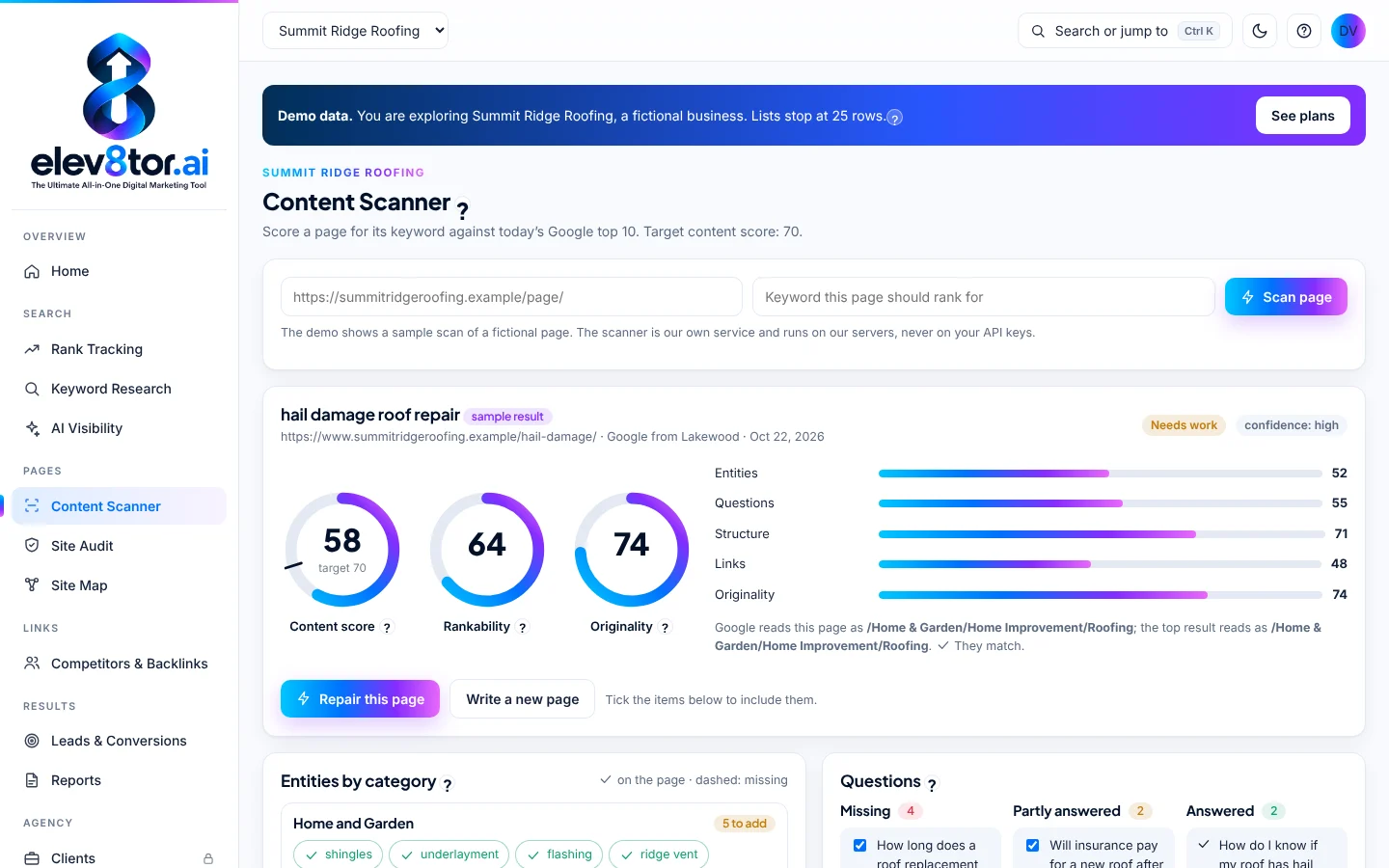
Paste a URL and its keyword. The elev8tor SEO content scanner reads the pages Google ranks today, estimates where your page will land, and hands you a ranked list of fixes with the exact sentences and anchor text, each with the points it is worth. Buy it on its own or add it to any plan.
The same scanner checks every client page Vertical Web publishes before it goes live. Developed by Vertical Web (Houston, since 1998) and Beth Guide.
WHY WE BUILT IT
Content that ranks now has to earn two readers
A page today is read by Google’s ranking systems and by the AI answers built on top of them. Both reward pages that cover a topic the way the best sources do and then add something those sources do not. Generic word counts and keyword density targets do not measure either.
We built the scanner for our own agency work at Vertical Web, where every client page is scanned before it ships. It measures a page against today’s results for its exact keyword, not against a fixed checklist. It is the content half of our AI search optimization method, and it pairs with a full SEO audit for the technical half.
Every part of the scan was designed to answer what to do next rather than to pile up data. The design decisions behind an SEO scanner that tells you how to rank are written up in full.
HOW A SCAN WORKS
Six steps, every time you press Scan
This is the real sequence the scanner runs. Nothing is a fixed template; every number comes from the pages ranking for your keyword on the day you scan.
01
Read today's top 10
Fetch the ten pages Google ranks for your keyword, plus up to 30 ranking pages for page factor comparisons.
02
Compare categories
Run your page and each ranking page through Google Natural Language categories. If Google files your page somewhere else, you see it first.
03
Count entities
Group entities by category and keep only those found on two or more different websites, with a density range per 1,000 words.
04
Find the questions
Pull questions from People Also Ask and the ranking pages, then mark each answered, partly answered or missing.
05
Check links and findability
Suggest internal links with the exact sentence and anchor, flag weak anchors, and test whether search and AI crawlers can read the page.
06
Score and plan
Produce the Content score, Rankability and AI Visibility, then rank every fix by the points it adds.
WHAT IT MEASURES
The mechanics, without the mystery
Google category match
Your page's Natural Language category against each page on page one, with a flag when they differ.
Entity density ranges
Targets come from the ranking pages' own 25th to 75th percentile per 1,000 words, not fixed counts. Image alt text is not counted.
Questions
Answered, partly answered or missing, from People Also Ask and the ranking pages.
Internal link suggestions
The page that should link, the exact sentence and the anchor text, plus weak anchors to rewrite.
Originality and information gain
An originality score, plus terms found beyond page one that could set your page apart.
Over-optimization check
Flags terms pushed past the range the ranking pages use, so you do not stuff a page to chase a score.
THREE SCORES, KEPT SEPARATE
Content score, Rankability and AI Visibility
Content score runs 0 to 100 with a target of 70. It reflects entity coverage, questions answered, category match and originality against today’s cohort.
Rankability adds internal link support to the Content score, because a strong page with no links pointing to it is hard for Google to find and weigh.
AI Visibility runs 0 to 100 and stays out of the Content score on purpose. A page can be well written and still blocked from AI crawlers, and you need to see those two problems separately.
THE ACTION PLAN
Every fix ranked by what it is worth
The scan ends in a ranked action plan. Each step shows the points it adds and the score you reach if you finish it, so you can stop at 70 instead of rewriting a page that only needs four sentences and two links. The plan also includes rank and AI pickup predictions, labeled as estimates until they are calibrated against real outcomes.
- Findability checks: noindex tags, a canonical pointing elsewhere, robots.txt access for Googlebot, Bingbot, OAI-SearchBot, ChatGPT-User, GPTBot, PerplexityBot, ClaudeBot and Google-Extended, and how much of your copy is in the HTML before JavaScript runs.
- AI source targets: the sites Google’s AI Overview draws on for the keyword, where your business could be listed.
- Local, national or auto: local scans filter map pack results and directories so you compare against the businesses you actually compete with.
We check the scanner every month against an internal benchmark of 30 real client pages from 18 client sites. When the scoring changes, it is dated in our patch notes.
THE CONTENT REVIEW WE TEACH
What a scan cannot write for you
The scanner checks five things. Two of them only you can supply, and they are what separates a page that ranks from a page that matches.
- Original: measured by the originality score. Rewording the top 10 scores low.
- Non-commodity: says what the ranking pages do not. Your first-hand experience, your own process, real numbers and real examples.
- Entity coverage: the concepts page one agrees on, inside the ranking range.
- Questions answered: every missing question closed, in plain words.
- Linked in: keyword anchors up to the parent page, down to supporting pages and across to siblings.
AUTOMATIC CONTENT
Repair this page, or write a new one
Once a scan is done, you choose what happens next. Either way the output is a draft for a person to review. Nothing publishes on its own.
Repair this page
Fixes the existing page in place from the action plan: missing entities worked into real sentences, missing questions answered, weak anchors rewritten. Your structure and voice stay.
Write a new page
Builds a full draft from the keyword brief: headings, entities with suggested mentions, the questions to answer, a word count range and the schema the ranking pages use.
An AI page repair uses 3 credits and a new AI page uses 8, from the same pool as your scans.
CONTENT IDEAS (EARLY ACCESS)
What to write next, taken from your competitors before anything else
Content Ideas is one screen per site that answers the question every content plan starts with: what are we missing? It looks at your competitors first, then at the gaps on your own site, then at the keywords you are close on. Every idea is one row with the keyword, the page type, a plain reason, the competitor pages behind it, and the search volume.
What you get from an idea depends on whether the site has a content plan. Without one, each idea is a suggestion: keyword, page type, why, and the evidence, with a Start a brief button if you want the full read of today’s top 10 (0.5 credit). With a plan, which means Autopilot is on or you have saved a posts per month cadence for the site, the top ideas come with the spec already built: target words, headings, entities by category with target mentions, the questions to answer, schema, and the pages on your site that should link in and out. Specs are built up to your cadence and never start a write on their own. See how the brief feeds the writer under the content scanner and what the loop costs on the SEO software pricing guide.
01
Competitors first
The pages your tracked competitors have that your site does not, grouped by topic and ranked by how many of them cover it. Each idea names the competitor pages, so you can see what you are up against before you write.
02
Missing pages and blogs
Services with no page, service areas with no location page, questions your scans found unanswered, and the terms Google shows on page one that none of the ranking pages use. Blog ideas are grouped under the page they should link up to.
03
Where competitors beat you
Keywords you already rank 4 to 30 for, by volume, with the ranking URL ready for a repair or a supporting page.
ON ITS OWN OR AS AN ADD-ON
Buy it on its own, or add it to any plan
You can buy the scanner on its own as Content Scanner only: no base plan, just credits, with unlimited users, and it scans any URL. Or add the same credits to any paid plan, including the Bring Your Own Data plans. The scanner is our proprietary engine and runs on our servers, never on customer keys, so it costs the same either way. You pay in credits only when you use it: a scan is 1 credit, a keyword brief 0.5, an AI page repair 3 and a new AI page 8. The free SEO tool demo includes 5 real scans, one time. Monthly price shown, annual price per month in parentheses.
Pay as you go
$1.50 a credit
- 20 credit minimum
- Good for 12 months
Scanner 50
$59/mo ($47)
- 50 credits a month
- About 50 page scans
Scanner 150
$149/mo ($119)
- 150 credits a month
- Any mix of scans, briefs and AI pages
Scanner 500
$399/mo ($319)
- 500 credits a month
- Sized for agency teams
Monthly credits do not roll over, so pick the pack that matches a normal month and top up with pay as you go credits when a month runs busy. Full plan details are on the SEO software pricing page. Agencies running many client sites should also see the agency SEO platform.
HONEST LIMITS
What the scanner does not do
It does not score page speed; that lives in the site audit. It does not promise a ranking, because no content score can. Predictions are labeled estimates. And it does not replace the person who knows the business, which is why every draft waits for review. For tracking what happens after you publish, use SEO tools like rank tracking and AI visibility, and connect GA4 lead tracking to see which repaired pages bring in leads.
FAQ
Frequently asked questions
An SEO content scanner compares one page against the pages Google ranks for its keyword today. The elev8tor scanner reads the top 10, records the entities, questions, categories and links those pages share, reads your page the same way, and turns the gap into a Content score and a ranked action plan.
A score of 100 would mean copying the ranking pages term for term, which is the commodity content Google’s helpful content guidance warns against. A 70 shows the page covers what the ranking pages agree on and leaves room for the original material that makes it worth ranking.
A term that shows up on only one ranking site is usually that site’s brand, staff name or product. Counting only entities found on at least two different websites keeps the list to what the topic needs, not what one competitor happens to say.
No, it is paid in credits. You can buy it on its own as Content Scanner only, with no base plan, or add it to any paid plan, including the Bring Your Own Data plans. It runs on our servers, never on your own API keys. The free demo includes 5 real scans, one time, so you can read full reports on your own pages first.
No. Repair this page and Write a new page both produce a draft. A person reviews it, adds first-hand detail and publishes it.
No, by design. Speed matters, but it belongs in a site audit. Mixing it into a content score would hide what the copy itself needs.
Yes. Content Scanner only has no base plan, just credits: pay as you go at $1.50 a credit with a 20 credit minimum, or Scanner 50 at $59, Scanner 150 at $149 or Scanner 500 at $399 a month. Users are unlimited and it scans any URL, yours or a client’s. Rank tracking, audits and the other modules come with the plans on the pricing page.
Scan a page before you rewrite it
Open the free demo and run 5 real scans on your own pages, one time. Then buy Content Scanner only, or add credits to any paid plan, when you are ready for more.
Related pages
- AI search optimization: The full mapping process the scanner is part of
- SEO audit: Technical checks the scanner leaves to the audit
- SEO tools: Every module in the platform
- Pricing: Plans and Content Scanner credits
- Free demo: 5 real scans, one time, no card
- Why elev8tor is different: The design decisions behind the scanner