
FREE CONNECTOR, ONE CONNECTION CODE
GA4 lead tracking that counts every form, call and order
Install the free elev8tor connector on WordPress, paste one code and every lead is tracked with its real source. Conversions go to GA4 from the browser and your server, and one click marks them as key events.
Included on every plan, including the free demo for one site. Developed by Vertical Web (Houston, since 1998) and Beth Guide.
THE PROBLEM
Most sites undercount their own leads
Browser tags miss conversions when visitors run ad blockers or privacy browsers. Form plugins each need their own setup. Phone taps often are not tracked at all. And the GA4 events that do arrive are not marked as key events, so they never show up as conversions in reports or in Google Ads.
We hit the same gaps on our own agency clients. A page could climb in rankings and nobody could prove it brought in a single lead. We built the connector so every improvement made with our SEO content scanner or our AI search optimization process can be tied to actual leads.
SETUP
From install to key events in five steps
01
Install the plugin
Add the free elev8tor connector to your WordPress site.
02
Paste one code
Copy the connection code from your elev8tor account into the plugin. That is the whole configuration.
03
Leads start flowing
Submissions from the supported form plugins, WooCommerce orders and tel: and mailto: taps are captured with their source.
04
Connect Google
Link your Google account in elev8tor so it can reach your GA4 property.
05
Mark key events
One click marks generate_lead, phone_click, email_click and form_submit as GA4 key events.
WHAT GETS TRACKED
Every lead source, and the GA4 event it sends
One connector covers the form plugins most WordPress sites already run, plus calls, emails and store orders.
What happens
When it counts
GA4 event
Gravity Forms, Elementor Pro forms, Contact Form 7, WPForms
Each form submission
generate_lead, form_submit
Ninja Forms, Fluent Forms, Formidable
Each form submission
generate_lead, form_submit
Phone number taps
Taps or clicks on tel: links
phone_click
Email address taps
Clicks on mailto: links
email_click
WooCommerce orders
Completed orders
purchase
What is recorded with each lead
Field
What it captures
First touch and last touch
The first visit that found you and the visit that converted
Campaign tags
UTM source, medium, campaign, term and content
Ad click ids
gclid, gbraid, wbraid, fbclid and msclkid
Context
Referrer, landing page and device
BROWSER AND SERVER
Two copies of each event, counted once
Each conversion is sent twice: once from the visitor’s browser and once from your server through the GA4 Measurement Protocol. The server copy still arrives when an ad blocker stops the browser tag. Both copies carry the same event id, so GA4 deduplicates them and counts the conversion once.
If the elev8tor app is down when a lead comes in, the plugin retries the delivery instead of dropping the lead. The plugin keeps its own local copy of each lead for 30 days only, then clears it.
PRIVACY
Consent Mode v2, and no personal data in GA4
No PII to GA4
Names, email addresses and phone numbers are never sent to Google Analytics, which Google Analytics policies do not allow anyway.
Consent Mode v2
The connector respects Google Consent Mode v2 and the choices visitors make in your consent banner.
No double tagging
Built to avoid double tagging with Site Kit, so one visit is not reported by two GA4 tags.
EVIDENCE-BASED CHANNELS
Every lead's channel shows how it was decided
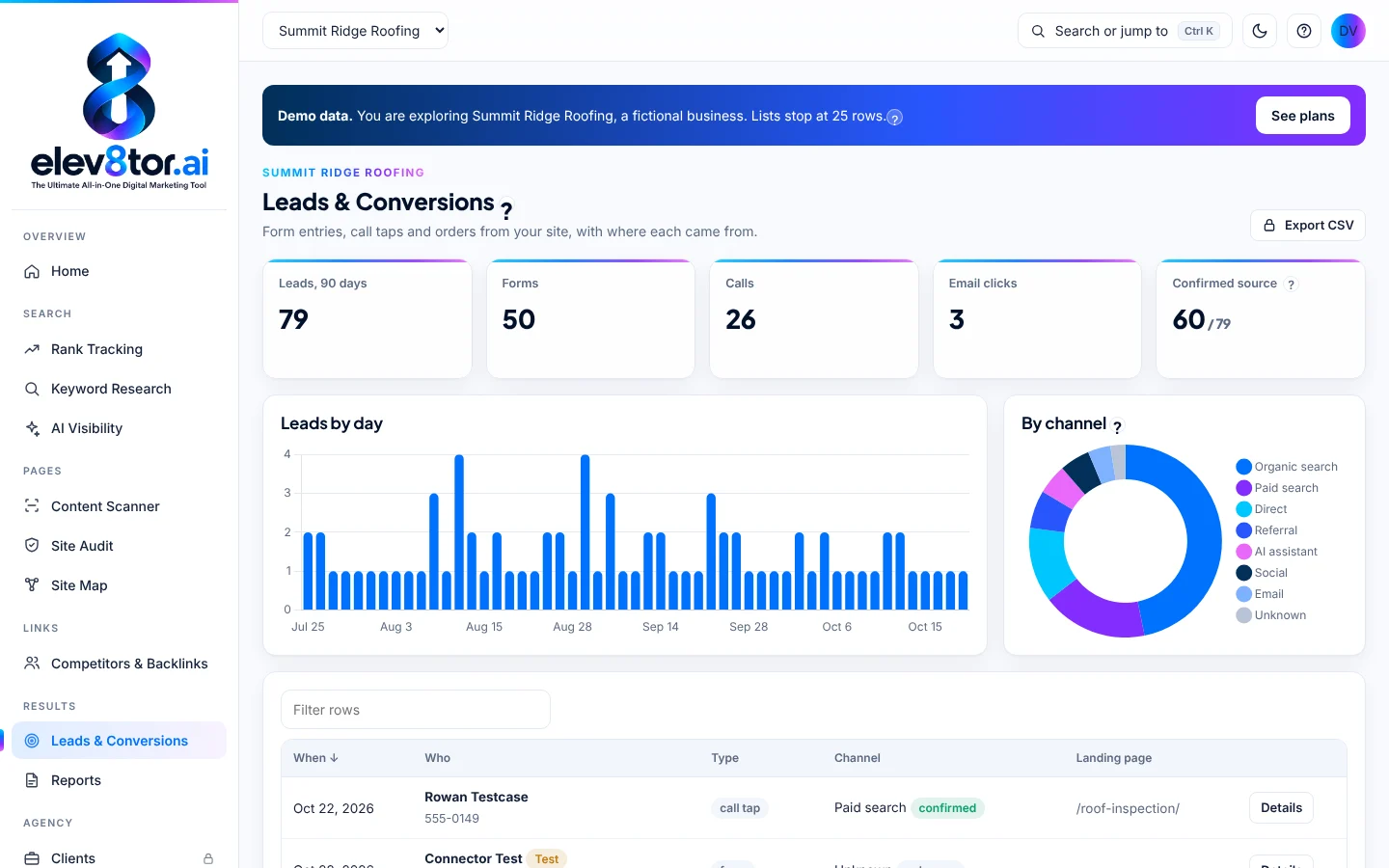
Not all attribution is equal. An ad click id is stronger evidence than a UTM tag, and a UTM tag is stronger than a bare referrer. Each lead in elev8tor carries its channel and an evidence label: confirmed, tagged, estimated or unknown. You see how sure the attribution is instead of a single confident answer.
When there is no evidence, the lead says unknown. We would rather show you a gap than fill it with a guess.
WHY NOT ASK THE VISITOR
We never use the "how did you hear about us" field
Plenty of forms ask visitors where they found you. elev8tor never sets a lead’s channel from that answer. People misremember, pick the first option in the list, or answer “Google” whether they came from an ad, a map listing, an AI answer or a friend who searched your name. The field is fine to keep for your sales team. It is not evidence.
The connector records what the visit itself proves: the click ids, campaign tags, referrer and landing page. That is what the evidence label is built from.
WHERE IT SHOWS UP
Leads next to the SEO work that earned them
Leads appear in elev8tor beside rankings and traffic, and in the weekly and monthly reports. Agencies can include them in white label SEO reporting so a client sees the leads, not just the positions. Nightly watchers also alert you if GA4 stops counting. See every module on the SEO tools page, or how agencies run it across clients on the agency SEO platform.
Lead tracking and one-click GA4 are on every plan, including the free SEO tool demo for one site. Owners who want guidance with it can start with our small business SEO software, and plan details are on the pricing page.
FAQ
Frequently asked questions
GA4 lead tracking records each form submission, phone tap, email tap and order on your site as an event in Google Analytics 4, so you can see which channels and pages produce leads. elev8tor sends those events from the browser and from your server, then shows each lead in the app with its source.
Install the free elev8tor connector plugin on your WordPress site and paste the one connection code from your elev8tor account. It then captures leads from the supported form plugins, WooCommerce, and phone and email taps.
Ad blockers and privacy browsers stop many browser tags from firing, so conversions go missing. The server side copy is sent through the GA4 Measurement Protocol. Both copies share an event id, so GA4 counts each conversion once.
No. Names, email addresses and phone numbers are never sent to GA4. The connector respects Google Consent Mode v2, and the plugin keeps its local copy of each lead for 30 days only.
The connector is built to avoid double tagging with Site Kit by Google, so you do not end up with two GA4 tags reporting the same visit.
Yes. Lead tracking and one-click GA4 are on every plan, including the free demo for one site.
Track your next lead with its real source
Start the free demo, connect one site and see your leads arrive with their evidence.
Related pages
- White label SEO reporting: Put leads in front of clients under your brand
- AI search optimization: Earn the visibility that brings the leads
- Content Scanner: Repair the pages your leads land on
- Pricing: Plans and add-ons
- Free demo: Lead tracking for one site, free